POST
/
api
/
v2
/
message
Mensaje con carrusel interactivo
curl --request POST \
  --url https://whatsapp.heybot.cloud/api/v2/message \
  --header 'Authorization: Bearer <token>' \
  --header 'Content-Type: application/json' \
  --data '
{
  "to": "<string>",
  "type": "<string>",
  "interactive": {
    "type": "<string>",
    "body": {
      "text": "<string>"
    },
    "action": {
      "cards": [
        {
          "card_index": 123,
          "type": "<string>",
          "header": {
            "type": "<string>",
            "[media_type]": {
              "link": "<string>"
            }
          },
          "body": {
            "text": "<string>"
          },
          "action": {
            "name": "<string>",
            "parameters": {
              "display_text": "<string>",
              "url": "<string>"
            },
            "buttons": [
              {
                "type": "<string>",
                "quick_reply": {
                  "id": "<string>",
                  "title": "<string>"
                }
              }
            ]
          }
        }
      ]
    }
  }
}
'

Documentation Index

Fetch the complete documentation index at: https://docs.heybot.cloud/llms.txt

Use this file to discover all available pages before exploring further.

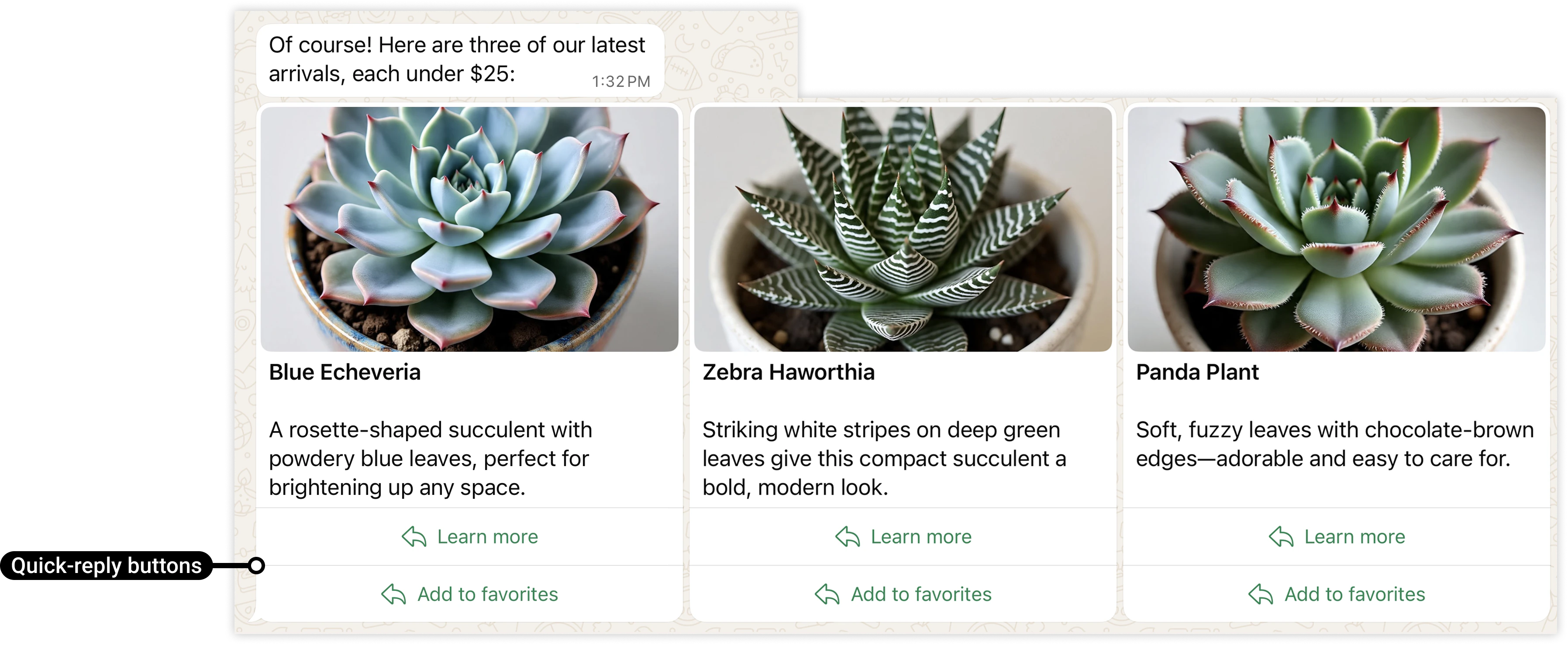
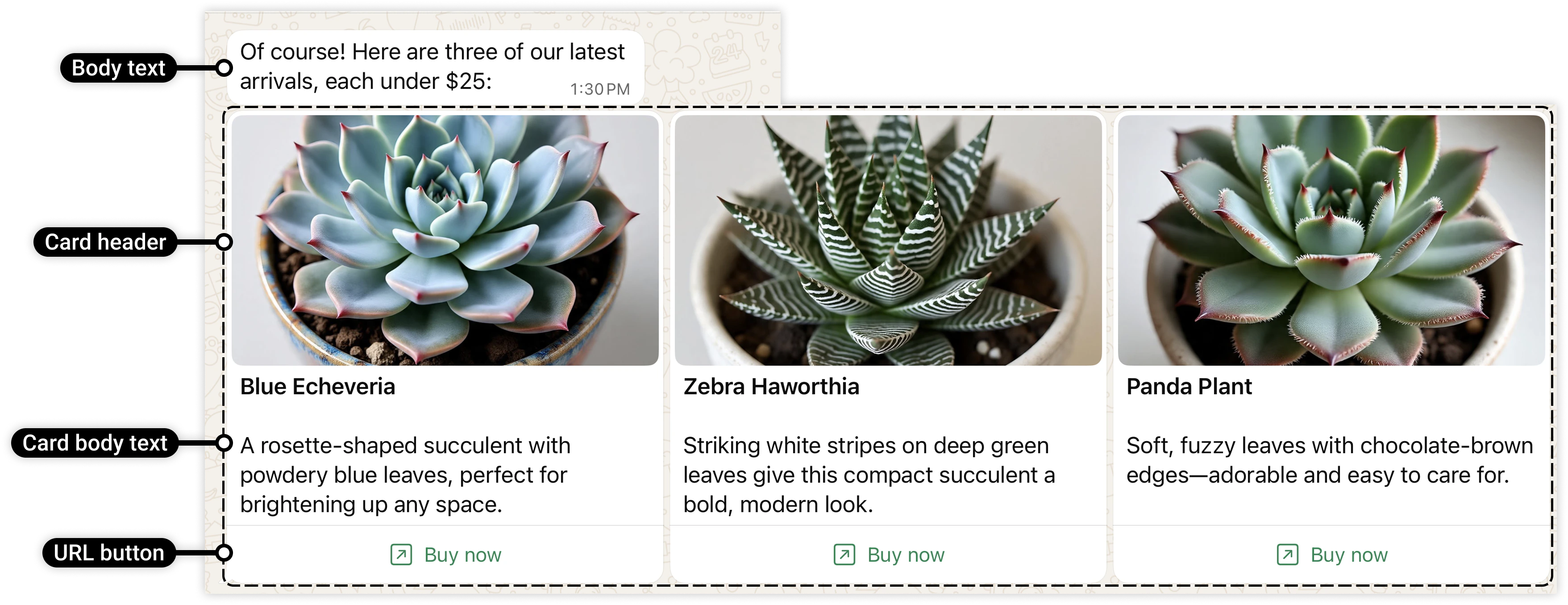
Los mensajes por secuencia con contenido multimedia interactivo muestran un conjunto de tarjetas de contenido multimedia que se pueden desplazar horizontalmente. Cada tarjeta puede mostrar un encabezado de imagen o video, un texto y botones de respuesta rápida o un botón de URL.
  • Los mensajes deben incluir entre 2 y 10 tarjetas.
  • Se requiere el texto del cuerpo del mensaje principal.
  • No se admiten encabezados, pies ni componentes interactivos de mensajes principales.
  • Las tarjetas deben incluir un encabezado de imagen o video. No se admiten otros tipos de encabezados.
  • El texto del cuerpo de la tarjeta es opcional.
  • Las tarjetas deben incluir un botón de URL o uno o más botones de respuesta rápida. Los tipos y números de botones deben coincidir en todas las tarjetas (por ejemplo, si defines una tarjeta con dos botones de respuesta rápida, todas las tarjetas deben definir exactamente dos botones de respuesta rápida).
to
string
required
The recipient’s phone number or WhatsApp ID.
type
string
default:"interactive"
required
The overall type of message being sent.
interactive
object
required
The interactive message payload configuration.

Ejemplo

{
  "to": 5219876543210,
  "type": "interactive",
  "interactive": {
    "type": "carousel",
    "body": {
      "text": "<MESSAGE_BODY_TEXT>"
    },
    "action": {
      <!-- First card object -->
      "cards": [
        {
          "card_index": <CARD_INDEX>,
          "type": "cta_url",
          "header": {
            "type": "<HEADER_TYPE>",
            "<HEADER_TYPE>": {
              "link": "<MEDIA_ASSET_URL>"
            }
          },

          <!-- Card body text is optional -->
          "body": {
            "text": "<CARD_BODY_TEXT>"
          },

          "action": {
            <!-- Only if using a URL button -->
            "name": "cta_url",
            "parameters": {
              "display_text": "<URL_BUTTON_LABEL>",
              "url": "<URL_BUTTON_URL>"
            }
            <!-- Only if using one or more quick-reply buttons -->
            "buttons": [
              {
                "type": "quick_reply",
                "quick_reply": {
                  "id": "<QUICK_REPLY_BUTTON_ID>",
                  "title": "<QUICK_REPLY_BUTTON_LABEL>"
                }
              },
              <!-- Additional quick-reply buttons would follow -->
          }
        },
        <!-- Additional card objects would follow -->
      ]
    }
  }
}